Operation of the Oven Control Unit
General warnings for the oven control unit
- The maximum time that can be set for the baking process is 5:59 hours. In keeping warm function, this time is 23:59 hours. In case of a power outage, the pre-set baking and baking duration are cancelled.
- In case of power failure, the program is cancelled. You will need to reprogram.
- While the oven operates in any function or if baking time or baking starting time settings are made on the control unit, the timer cannot be set.
Turning on and off the oven
- When you plug in the oven and it is on stand-by position, touch the
 button for approximately 3 seconds.
 - After oven display animation, main menu display is shown.
- While the oven is active, you can turn off the oven by touching button for approximately 3 seconds.
Activating the remote control connection of the oven
- Touch the
 button on the control panel. Remote control connection will be activated.
 - Touch the button on the control panel. Remote control connection will end.
Activating the key lock
By using the key lock feature, you can safeguard the interference of the oven control unit.
Touch the  button on the control panel for approximately 3 seconds and activate the key lock When the key lock is activated, key on the control board will remain lit.
NOTICE

When the key lock is active, only key works. When the key lock is active, turn off the oven.
Deactivating the key lock
- Touch the button on the control panel for approximately 3 seconds and deactivate the key lock
- The key lock is cancelled.
Using the water tank
- Touch the "
 " key on the control panel. The water tank will come out.
 - Take out the water tank, empty the water in it (if any) and add clean water up to the "max." level at most.
NOTICE
Risk for health! Do not use any other liquids apart from potable water in the steam system.
NOTICE
Do not use distilled or filtered water. Use bottled water only. Do not add solutions that are inflammable, contain alcohol or solid particles into the water tank.
NOTICE
Thanks to the cover on the tank, you can also fill it without taking it out.
- Replace the water tank and push it into its slot.
NOTICE
Before starting steam cooking or steam assisted cooking functions, make sure that the cover of the meat probe socket is closed.
- At the end of the cooking cycle, discharge the remaining water in the tank for reasons of hygiene.
NOTICE
The water in the steam generation system of the oven will be sent to the water tank in about 15 minutes once the cooking is completed. Discharge this water accumulating in the water tank for reasons of hygiene.
Baking Menu
Baking with oven functions
- Turn on the oven by touching the key.
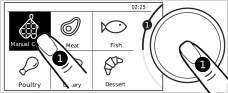
- Home display menu is shown when the oven is turned on. "Manual Cooking" menu is selected on the display.
- Access the baking functions by pressing on the control button once or touching "Manual Cooking" menu on the display.
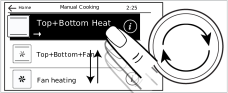
- Select the baking function you want by turning the control knob to the right/left or sliding your finger over the display.
NOTICE
You can enter the submenus by touching main menus which appear on the main menu display, however you cannot scroll through them to access other main menu titles. Use the control knob to access the other main menus.
NOTICE
You can access details about the related function by touching "
 " button on the baking function selecting display. In order to go back to the previous main menu, touch "
 " key, which is available on the top left corner of the display.
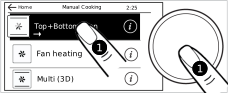
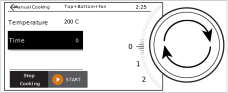
- When the function you want to use for baking is selected on the display, touch the related function on the display or press on the control knob once. In the information display of the related function, you can make settings such as temperature, probe temperature (if meat probe is provided with your product), baking time, baking starting time.
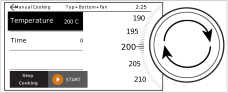
- To change the temperature: The temperature setting will remain active when you access information display of the function you will use for baking. Turn the control knob to the right/left and select the temperature you want to use for baking. To confirm the setting and continue to other settings, press on the control knob once or touch the other settings you want to make on the display.
- For setting probe temperature: If a meat probe is provided along with your product and you will cook with a meat probe, you should set probe temperature in this field. For baking with a meat probe, follow the steps explained in "Using Meat Probe" field.
- To set the baking time: If you want to operate your baking in the function and at the temperature you have set for a while and finish the baking automatically at the end of the time, set the baking time on this display. If you select the "0" setting, you need to follow the baking manually and stop it yourself.
- Set the baking time you want by turning the control knob to the right/left. To confirm the setting and continue to other settings, press on the control knob once or touch the other settings you want to make on the display.
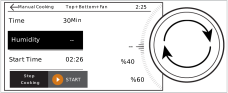
- For setting the steam level during steam assisted baking: You can perform steam assisted cooking in “full steam” baking function or other baking functions where a fan motor/fan heater operates. If you will perform steam cooking, set the steam level on the information screen of the related function. You can find the detailed information about steam cooking levels in “Steam assist” field. Before starting steam cooking/steam assisted baking, you should fill the water tank with the water by following the steps, which are explained in the “Using the water tank” field. If you will not perform a steam cooking, skip this setting by pressing on the control knob once or touching the other settings on the display.
- Set the steam cooking level you want by turning the control knob to the right/left. To confirm the setting and continue to other settings, press on the control knob once or touch the other settings you want to make on the display.
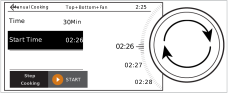
- To set the baking starting time: (It varies depending on the product model. It may not be available on your product.) If you want your baking to start at a time determined by you, you can adjust the baking starting time by setting the minute you want to postpone with the control knob in the "Start Time" field. When you make a setting, the oven starts to cook when the oven reaches the adjusted time and it will work as long as the baking time you have adjusted previously. In order to set the baking starting time, the timer settings of your oven must be updated. If it is not updated, update the oven timer settings as it is explained in the “Settings” field. If you want to cook without setting the baking starting time, skip this setting by pressing on the control knob once.
NOTICE
Temperature, probe temperature (if a meat probe is provided with your product), duration, starting time settings may not be available in all functions. Some of the settings may be available according to the operating principle and purpose of the related function.
- If all your settings are suitable, start baking by touching the "START" key on the display. Preheating display is shown.
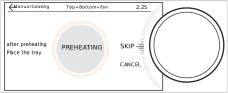
- For setting preheating: On the preheating display, the oven will set the oven inner temperature to the adjusted temperature in a short time by operating all heaters to reach the adjusted temperature. You can wait for the completion of preheating, specific to the meal you will cook, on this display or bring the control knob to the "SKIP" level and skip the pre-heating by touching the control knob once.
NOTICE
If you bring the control knob to the "CANCEL" level and press on the knob once, all your baking settings are cancelled and the oven goes back to the main menu display.
- When the preheating is completed, the suggestion for the shelf position, where you will place the oven tray, is shown on the display. You can place your meal on the different shelves, which are mentioned on the baking table specific to your meals.
- The baking will start once you place the meal in the oven and close the oven door. While the baking continues, you can cancel the baking or rearrange your settings.
NOTICE
If the oven door is opened during baking, "
 " symbol is shown on the display.
- If the baking time is not adjusted; the oven works manually. If your meal is cooked, bring the control knob to the "CANCEL" level and end the baking by touching the knob once. Otherwise, the oven continues to work.
- If only the baking time is adjusted, the oven stops to work at the end of baking time. “Cook Ended” indication appears on the display.
- If the baking time and baking start time are adjusted, when (It varies depending on the product model. It may not be available on your product.) reaches the baking starting time you have set, the oven starts to cook and is heated up to the adjusted temperature. It maintains this temperature until the end of the baking time. The oven stops to work at the end of the baking time. “Cook Ended” indication appears on the display.
- When the baking is completed, if you bring the control knob to the "CONTINUE" level and press it once, the oven continues to work for 5 more minutes at the adjusted function and temperature settings. If you bring the control knob to the "Home" level and press on it once, the oven goes back to the main menu display. If you bring the control knob to the "SAVE" level and press on it once, you can save the baking settings you have made by entering a specific name into the favourite field.
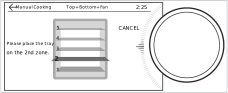
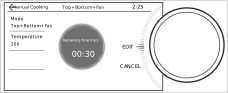
Add step function
This function, after setting the temperature and time, allows you to set different cooking modes, temperatures and times for the same food.
After making all your settings for your first cooking, you can adjust the cooking settings that will continue after the first cooking by adjusting the cooking function, temperature, time and steam function, if any, on the screen that appears by touching "Step Cooking ". Once the first cooking settings are completed, the food continues to cook at the second set cooking settings.
NOTICE
The set the cooking starting time, can only be selected for the first cooking setting.
NOTICE
After the first cooking setting is made, a maximum of 5 step cooking settings can be set.
Automatic Baking Menus
- The menus, available on the oven control unit, includes recipes, which are specially prepared for you by professional cooks. In these menus, how to cook a meal is explained step by step with the help of pictures. Moreover, temperature, shelf position and baking functions are automatically determined according to the type and weight of the meal. These recipes are available under the "Meat","Fish", "Poultry", "Bakery", "Dessert", "Pizza", "Vegetarian", "Pasta", "Cakes/Pastries" and "Special" titles on main menu screen.
- Turn the oven on by touching the “” key.
- Home screen menu is displayed when the oven is turned on. "Manual Cooking" menu is selected in the screen.
- Turn the control knob to the right / left to select the "Automatic Cooking” menu you want.
NOTICE
You can enter the submenus by touching main menus which appear on the main menu screen, however you cannot scroll through them to access other main menu titles. Use the control knob to access the other main menus.
- Select the meal you want to cook by turning the control knob to the right/left or sliding your finger over the display.
- Access the meal menu by touching the meal you have selected or pressing on the control knob once. You can see the recipe on the meal menu screen and set the baking starting time.
- To set the baking starting time: (It varies depending on the product model. It may not be available on your product.) If you want to start to cook at a time you have determined, you can make a timer setting in the "Start Time" field. When you make a setting, the oven starts to cook when the time you have adjusted comes and it will work as long as the cooking time, which is defined for the ready-to-serve meal menu. In order to set the baking starting time, the timer settings of your oven must be updated. If it is not updated, update the oven timer settings as it is explained in the “Settings” field. If you want to cook without setting the baking starting time, you can immediately start baking by touching "START" button.
- Preheating will be started for the meals which require preheating. On the preheating display, the oven will set the oven inner temperature to the adjusted temperature in a short time by operating all heaters to reach the adjusted temperature. This process cannot be skipped in the meals defined for preheating.
- For the automatic meal menu recipe: We advise you to cook according to the recipes available in the timer for the automatic meal menus. In order to access a recipe, touch on "View Recipe" available on the screen.
- To read the recipe on the recipe screen, you can scroll through your display or turn the control knob to the right/left.
- To read the recipe content, you can touch on "Ingredients" available on the screen and then scroll through the display or turn the control knob to the right/left. In order to exit recipe screen, touch "" button, which is available on the top left corner of the screen.
- After preparing your meal according to the recipe, if all your setting are suitable, start the baking by touching "START" button on the screen. The baking time appears on the screen.
NOTICE
If the oven door is opened during baking, "
" symbol is displayed on the screen.- The oven stops to work at the end of the baking time. “Cook Ended” indication appears on the display.