Automatic Dosing
Initial Installation
Turn on the machine with the On/Off key. Dosage symbol ( ) appears in programs where detergent dosing is allowed. If the liquid detergent or softener compartments are empty, the dosage symbol will flash in programs where detergent dosing is allowed.
Filling Liquid Detergent and Softener
- Slightly push the marked area on the detergent drawer to open it.
NOTICE

Make sure to close the detergent drawer before operating the product. Push the drawer fully to close it. If you do not push it fully, the spring force will open it back.
- To fill liquid detergent (left) or softener / alternative liquid detergent (right), open the related tank’s lid by pulling it upwards as shown in the picture.
- Remember not to exceed the “Max” sign when adding liquid detergent or softener.
- Close the lid of the compartment.
- Close the detergent drawer by pushing lightly.
- After closing the detergent drawer, the flashing dosage symbol () starts lighting up continuously.
- It indicates that the compartments are filled successfully and the detergent drawer is in its place.

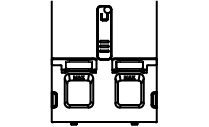
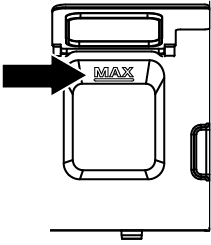
We recommend filling the liquid detergent compartment with liquid detergents that can be used in common for coloured and white laundry.
If the detergent symbol is flashing even though the detergent compartments are filled, the detergent drawer is not seated properly. Push the drawer so that it is fully seated.
WARNING

WARNING
When the detergent drawer is filled with detergent and/or softener; do not pull or move the equipment, and do not tilt it on either side or back.
Before conducting these operations, the detergent drawer must always be removed from the machine.
If you wish to start the program while there is no detergent in the detergent drawer, liquid detergent dosage must be cancelled and washing with powder detergent is required.
Add only liquid detergent in the liquid detergent compartment No 1, and add only softener or alternative liquid detergent (depending on your choice) to the softener/alternative detergent compartment No. 2. For compartment No. 2, select softener or liquid detergent on the screen. If you want to make a change in this compartment after use, completely drain and clean the compartment of the softener or detergent and then add softener or alternative liquid detergent. Then, select softener or liquid detergent for Compartment No. 2 on the screen. Putting all kinds of liquid and powder chemicals together inside the compartments may damage your laundry or your product.