Setting the Water Softening System
When the water softening system is set correctly, the washing, rinsing and drying performance of your dishwasher will increase.
After the determination of the water hardness:
1. Press the Delay and Program keys simultaneously for 3 seconds to enter the settings menu after turning your machine on.
2. Keep the program knob pressed until the low salt warning indicator starts to flash. Current regeneration level is indicated on the program indicator.
3. Set the water hardness to a proper level for the hardness of your mains water with the Delay key. For the correct setting, refer to the "Water hardness level setting table”.
4. Save by pressing On / Off key.
Hardness Level | English Hardness °dE
| German Hardness °dH
| French Hardness °dF
| Water Hardness Level Indicator
|
0. Level | 0-5 | 0-4 | 0-8 | Bring the water hardness setting to position 1 by pressing the Select key. (r1) |
1. Level | 6-9 | 5-7 | 9-13 | Bring the water hardness setting to position 1 by pressing the Select key. (r1) |
2. Level | 10-15 | 8-12 | 14-22 | Bring the water hardness setting to position 2 by pressing the Select key. (r2) |
3. Level | 16-19 | 13-15 | 23-27 | Bring the water hardness setting to position 3 by pressing the Select key. (r3) |
4. Level | 20-24 | 16-19 | 28-34 | Bring the water hardness setting to position 4 by pressing the Select key. (r4) |
5. Level | 25-62 | 20-50 | 35-90 | Bring the water hardness setting to position 5 by pressing the Select key. (r5) |






Make the same hardness level you set on the control panel with the regeneration adjustment switch. For example, if the setting on the control panel is 3, set the regeneration setting switch to 3.
- If the hardness of the water you use is above 50°dH (French hardness) or if you use well water, it is recommended to use filters and water purifiers.
- If the hardness of the water you use is below 7°dH, you do not need to use salt in your dishwasher. In this case, the "Salt Shortage Warning Indicator" on the control panel of your machine will be on continuously.
- If your water hardness setting is at level 1, the "Salt Shortage Warning Indicator" will remain on continuously even though you do not need to use salt. If you use salt in this position, salt will not be consumed and the lamp will not light.
Mechanical Water Hardness Adjustment
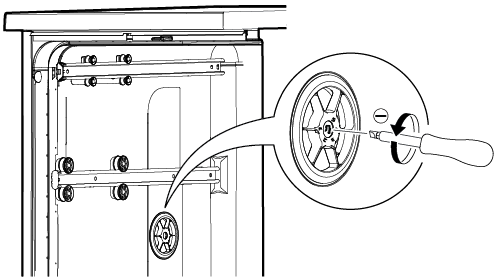
The glass care function setting is used to adjust the water hardness level of the pre-softened wash water in the dishwasher. The setting must be made according to the water hardness setting level. The adjustment is made with a wide, flat screwdriver. The screwdriver is used to turn the mechanical glass care adjustment switch. Only turn the mechanical switch to the same position as the water hardness setting level.
For example,
Set the Mechanical Glass Care adjustment switch to position 3 for water hardness level "r3"
Set the Mechanical Glass Care adjustment switch to position 4 for water hardness level "r4"